Jobber vs Housecall Pro: Real Prices for 1 to 5 People
Driveway Desk team 3 November 2026 9 min read

Your next job
Less time at the desk.
Build your price book, schedule the next visit and turn completed work into an invoice.
Start your first quoteIn this article
Jobber vs Housecall Pro comes down to crew size. For a one-person business that needs QuickBooks sync, Jobber Connect costs $139 a month against $189 for Housecall Pro Essentials on monthly billing (prices checked November 2, 2026). For a crew of two to five, the two land within $10 a month of each other, so the right pick is whichever one fits how you quote, schedule and invoice.
Short answer
Solo with QuickBooks: Jobber Connect is $50 a month cheaper on monthly billing and $50 cheaper on annual. Two to five people: Jobber Connect $199 vs Housecall Pro Essentials $189 monthly, $149 each on annual. Test the workflow before you pick.
Most comparisons line up the cheapest plan from each company and call a winner. That answers the wrong question. Hold one requirement constant, then compare the plans that meet it. Here the requirement is accounting sync, because almost every small crew needs its invoices in QuickBooks, and it moves both vendors off their entry plans.
Price check: same requirement, same crew size
Jobber vs Housecall Pro: crew cost calculator
Compare subscription costs for the selected plans with QuickBooks Online sync. Annual means paid annually; introductory discounts are excluded.
1 person
3 people
5 people
Subscription only, USD. Taxes, processing fees and optional add-ons are separate. No extra-user fee applies to the included seats in these 1, 3 and 5-person scenarios.
- Jobber official pricing. Prices checked 2026-10-12.
- Housecall Pro official pricing. Prices checked 2026-10-12.
Both vendors publish standard prices in USD, before sales tax. These are the plans that include QuickBooks Online sync, at monthly and annual billing.
| Plan with QuickBooks sync | Users included | Monthly billing | Annual billing (per month) |
|---|---|---|---|
| Jobber Connect, team size "Just me" | 1 | $139 | $99 |
| Jobber Connect, team size 2-5 | 5 | $199 | $149 |
| Housecall Pro Essentials | 5 | $189 | $149 |
Sources: Jobber pricing page and Housecall Pro pricing page, both checked November 2, 2026. Standard prices, excluding introductory promotions and tax. The calculator above carries its original October 12, 2026 check; the same prices were still listed on November 2. Prices change; confirm on the vendor page before you buy.
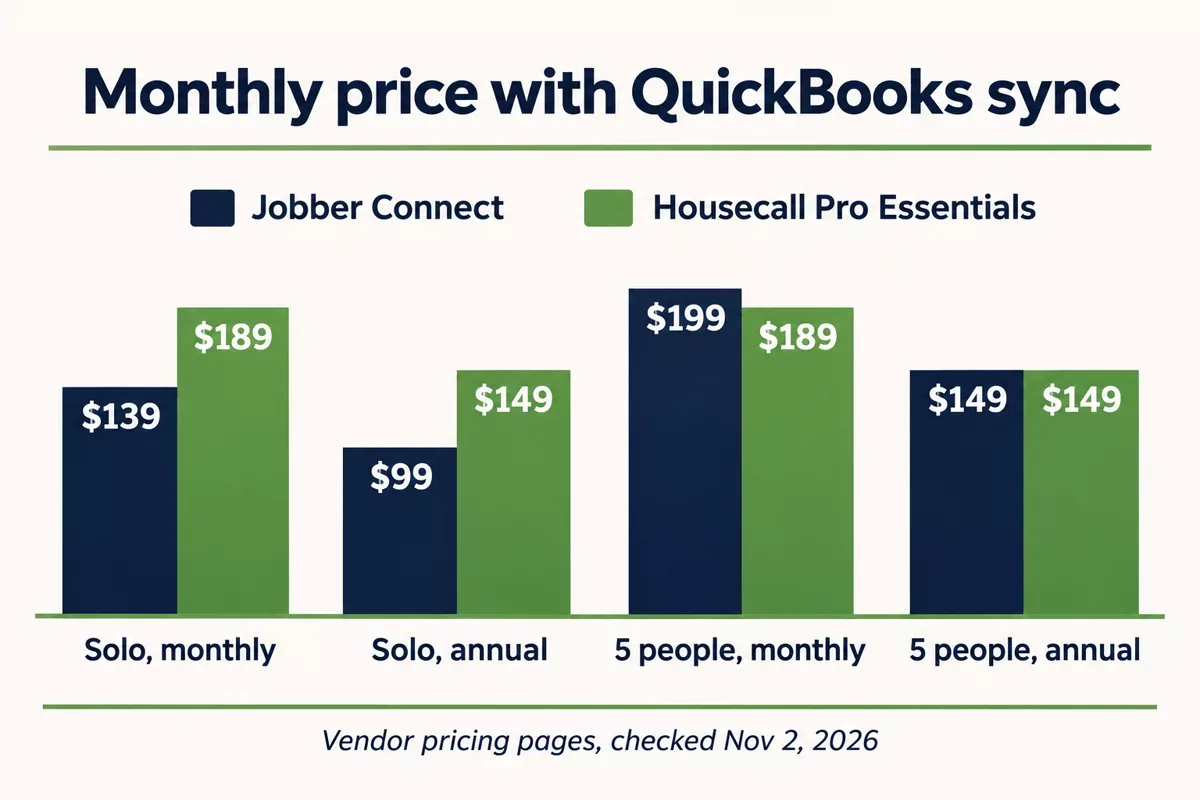
The entry plans do exist: Jobber Core at $49 a month for one user ($29 on annual) and Housecall Pro Basic at $79 a month for one user ($59 on annual). Jobber lists QuickBooks Online sync under Connect, and Housecall Pro lists QuickBooks Online and Desktop under Essentials, so if you need the sync, the entry price is not your price.
Which one costs less for your crew?
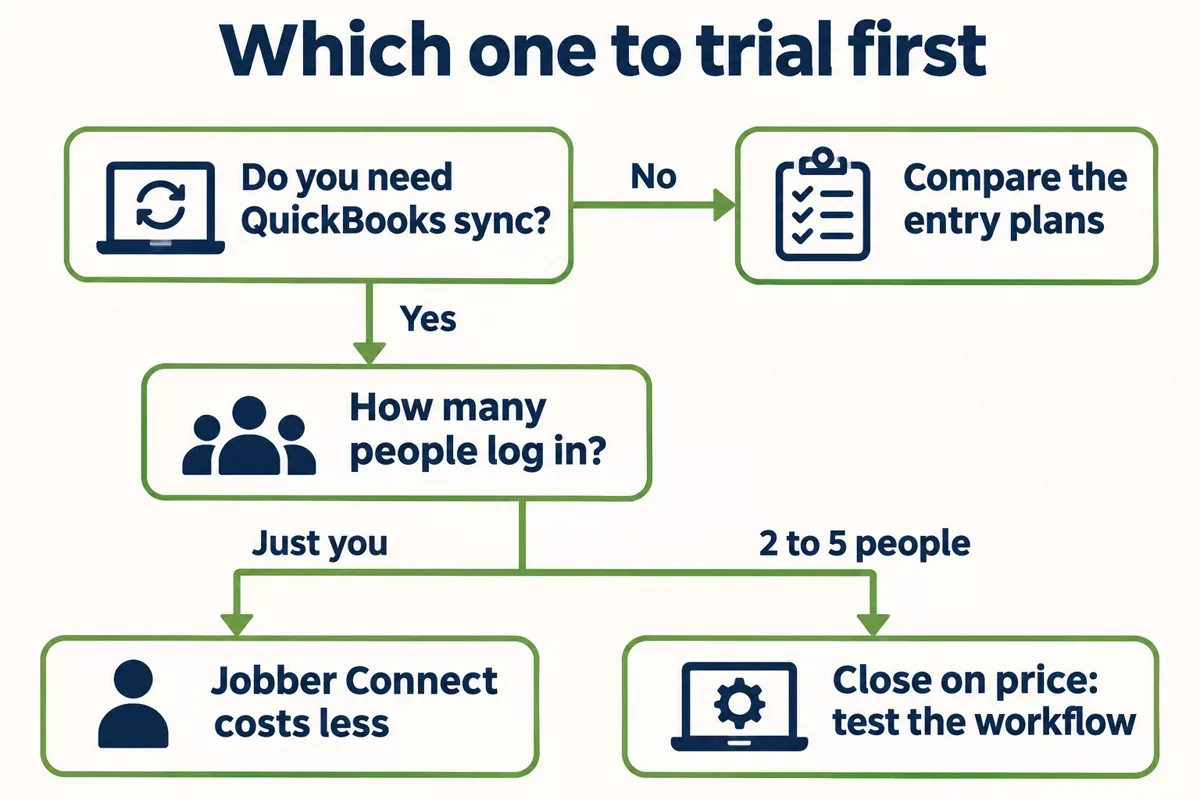
The answer flips with the number of people who need a login. Count everyone: the owner who quotes, the helper in the field, the spouse who does the books on Sunday.
| Your situation | Cheaper subscription | By how much | What to do |
|---|---|---|---|
| Solo, needs QuickBooks, pays monthly | Jobber Connect | $50 a month | Start the Jobber trial first |
| Solo, needs QuickBooks, pays annually | Jobber Connect | $50 a month equivalent | Same, if you are sure about a year |
| 2 to 5 people, pays monthly | Housecall Pro Essentials | $10 a month | Price is a wash: test both workflows |
| 2 to 5 people, pays annually | Tie | $0 | Decide on workflow only |
| No accounting sync needed, solo | Compare the entry plans | Depends on features you need | Jobber Core and Housecall Pro Basic |

Annual prices are quoted per month but billed up front: $149 a month on annual is $1,788 paid for the year. Only take the annual price if you are confident enough in the software to commit for twelve months.
| 12 months of subscription | Jobber Connect | Housecall Pro Essentials |
|---|---|---|
| Solo, monthly billing | $1,668 | $2,268 |
| Solo, annual billing | $1,188 | $1,788 |
| 5 people, monthly billing | $2,388 | $2,268 |
| 5 people, annual billing | $1,788 | $1,788 |
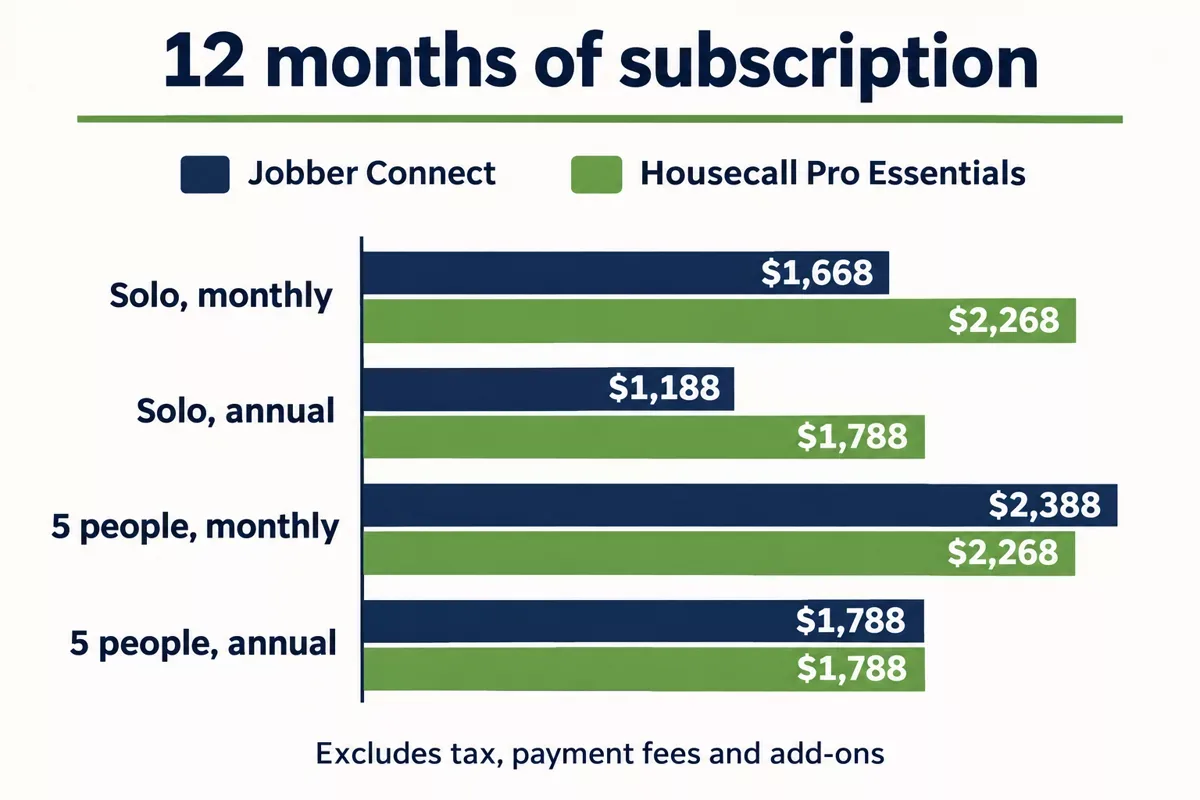
Those totals are subscription only. They leave out sales tax, card processing fees and optional add-ons. Jobber sells Pipeline (lead and quote tracking) as a $49 a month add-on on its lower plans. Housecall Pro puts its sales proposal tool and recurring service plans in its MAX plan, which is $329 a month on monthly billing for 8 users. If one of those is a must-have, price the plan or add-on that actually contains it.
Feature gates that matter to a small crew

| What you need | Jobber | Housecall Pro |
|---|---|---|
| QuickBooks sync | Connect and above | Essentials and above |
| Automated quote and invoice follow-ups | Connect and above | Check the plan detail on the pricing page |
| Two-way text with customers | Grow and above | Check the plan detail on the pricing page |
| Job costing | Grow and above | Listed from Basic |
| Recurring service plans | Check how recurring jobs work on your plan | MAX |
| Users before extra cost | 1 on "Just me", 5 on the 2-5 team plans | 1 on Basic, 5 on Essentials, 8 on MAX |
Source: the same two pricing pages, checked November 2, 2026. Where a page does not state a feature for a plan, the table says to check rather than guessing.
Do not mark two boxes equal because both companies use the same word. "Follow-ups", "recurring" and "job costing" can mean very different workflows. Ask each vendor to show you the exact sequence you run every week.

How to test both in one week
How to compare Jobber and Housecall Pro on a real job
- Pick one real job you did last month
Use a job with a revision in it: a quote the customer changed, or an extra part you found on site. A perfect job hides the friction.
- Run the quote in both trials
Build the same quote with the same line items. Your own estimate template is a good script to follow.
- Schedule it and hand it to a helper
Assign the visit, change the time once, and look at what the helper sees on their phone. The work order template shows what a field handoff should include.
- Invoice it and sync it
Turn the job into an invoice, take a test payment if the trial allows, and check what lands in QuickBooks.
- Ask how you get your data out
Customer list, job history, invoices. If you leave in a year, you want those in a file you can open.
Time each step only if you know both tools equally well; otherwise you are measuring which one you tried second.
What neither subscription fixes
Both tools are built to grow with a crew that adds dispatchers and office staff, and the plan ladders reflect that. If you are one to five people, the real cost is often your evenings: re-typing prices into quotes at the kitchen table after a full day on the tools. Before you pay for any software, know what an hour of your time costs; the labor cost calculator works it out.

That is the wall Driveway Desk is built for: your price book remembered, a quote drafted from it on your phone in the driveway, the schedule and reminders handled, and the invoice paid into your own Stripe or Square account, with QuickBooks or Xero sync. Our pricing page has the plans. For the full plan ladders, see the Jobber pricing breakdown, Housecall Pro plans explained and the wider list of Jobber alternatives for small crews.
Price it once, then start your first quote from the driveway next time.
Price it once, then start your first quote from the driveway next time.
Product names belong to their owners. Driveway Desk is not affiliated with Jobber or Housecall Pro.
The short version
Solo and need QuickBooks: Jobber Connect is the cheaper subscription by $50 a month. Two to five people: the price gap is $10 or nothing, so pick on the workflow you tested on a real job. Either way, recheck both pricing pages on the day you buy. Your prices, remembered. Build your first quote on your phone in about two minutes, send it, and get paid into your own account.
Put the method to work
Labor cost calculatorDivide paid-hour costs by the billable-hours ratio, then allow for your target margin to find a selling rate.
Frequently asked questions
For one person who needs QuickBooks sync, yes: Jobber Connect is $139 a month against $189 for Housecall Pro Essentials on monthly billing, checked November 2, 2026. For two to five people the gap is $10 a month on monthly billing and zero on annual.
Housecall Pro lists Basic at $79 a month (1 user), Essentials at $189 (5 users) and MAX at $329 (8 users) on monthly billing, or $59, $149 and $299 a month on annual billing. Prices are in USD before sales tax, checked November 2, 2026.
Neither is better for every crew. Jobber is cheaper for a solo owner who needs accounting sync; for two to five people the prices are close enough that the deciding factor is which workflow fits your jobs. Run the same real job through both trials.
For small home-service crews the usual shortlist includes Jobber, ServiceM8, Kickserv and Workiz, with ServiceTitan aimed at much larger shops. Compare them on the plan that meets your must-have requirement, not on the entry price.
The entry plan is not; Jobber Core starts at $49 a month for one user. The price climbs because features most crews want, like QuickBooks sync and automated follow-ups, start on Connect, and two-way texting and job costing start on Grow.
It is worth it if it saves more of your time than it costs. At $139 a month, it has to save you roughly two hours a month at a $70 hourly cost. Test it on real jobs during the trial and count the evening hours it actually removes.
Put the method to work
Labor cost calculatorDivide paid-hour costs by the billable-hours ratio, then allow for your target margin to find a selling rate.
Your prices, remembered.
Build your first quote on your phone in about two minutes, send it, and get paid into your own account.
Start your first quoteShare article
About the author
Field notes team
We write practical guides for home service crews of one to five. Our editorial standard is to show the calculation, state its assumptions, cite primary sources for factual claims and date competitor comparisons. We distinguish worked examples from market prices and correct errors when they are found. We do not claim trade licenses or credentials on behalf of the team.
More articles

Running a small crew · 11 min
How to Become a Handyman: 5 Steps and the Math That Pays
How to become a handyman: build the skills on paid hours, check your state's license line, register and insure, then set a minimum visit. Real BLS pay figures and the drive-time math that decides what you earn.

Running a small crew · 12 min
How to Get a Handyman License: State Rules and Dollar Limits
How to get a handyman license: many states have none, so the job decides. The dollar limit, the permit, the trade and your helpers set the line. Rules for California, Tennessee, Louisiana, Ohio and Wisconsin, plus the steps to license up.

Running a small crew · 9 min
Jobber Alternatives: 4 Options Priced for Small Crews
Find a Jobber alternative for a small crew. Compare dated vendor costs, user limits and job allowances, then test the workflow your business needs.

Running a small crew · 10 min
Housecall Pro Pricing 2026: Basic, Essentials and MAX
Compare Housecall Pro pricing for small crews, with standard plan costs, included users, QuickBooks requirements and separate payment-fee notes.

Running a small crew · 10 min
Jobber Pricing 2026: Real Cost for 1, 3 and 5 People
Review Jobber pricing for one, three or five people, with dated plan costs, QuickBooks gates and payment-fee examples for a small service crew.

Running a small crew · 12 min
Work order template: free printable job sheet with a filled example
A free work order template you can fill in, print or save as a PDF, plus what to include, how to write one and a filled example from a real residential job.